
read time: 1 min
Today’s Executive Assistants (EAs) are part strategist, part operator, and part problem solver. This goes beyond managing schedules and logistics; EAs enable decisions, drive alignment, and create space for executives to focus on high-level needs.
But without technology to amplify your expertise, there comes a limit to how far your impact goes. The goal isn’t to just add more software to your day, but to choose tools that make your work more strategic — automating routine tasks, streamlining planning, and helping you stay one step ahead.
How to choose tools as an Executive Assistant
Before adding a new tool, think beyond your to-do list. Consider how it supports your executive, your team, and the wider business goals. The right tools simplify work — not add to it. They should help you operate efficiently, share information easily, and make confident, data-driven decisions.

Understand the following before asking for approval:
- How does the tool align with company goals? For example, will it improve executive efficiency, collaboration, or visibility across teams?
- Which teams and individuals need access to the tool and do you need buy-in from them?
- Is it intuitive enough for quick adoption? Can you learn it quickly and teach others without formal training?
- How long does set-up and onboarding take?
- Does it meet IT and security needs?
- What’s the ROI? Will it be measured in time savings, efficiency gained, or something else?
Download the playbook to get the "yes" for tools you need.

The best tools for Executive Assistants
Usability and cost shouldn't be barriers to proving your impact. Organized by relevant categories, the tools below include easy-to-use and low-to-no cost options.
AI tools
1. LLM of your choice
Most LLMs, like ChatGPT or Gemini, act as a digital thinking partner so you can plan, write, and problem-solve with speed and precision. LLMs can draft clear emails, summarize meetings, create talking points, or turn ideas into outlines in seconds.
Whether you’re preparing executive updates, organizing meeting materials, or brainstorming next steps, an LLM helps you communicate clearly and work more strategically.
You can find more practical ChatGPT prompt examples for meeting planning in our blog; a quick way to put these ideas into action.
2. Otter.ai
Otter.ai helps you stay fully engaged in meetings by automatically capturing and transcribing every detail in real time. Instead of juggling notes, you can focus on the conversation — knowing key points, action items, and decisions are recorded and easy to reference later.
The result: clearer follow-ups, faster recaps, and fewer missed details. It’s an effortless way to stay organized and turn every discussion into action.
Meeting planning
3. TROOP
TROOP brings every part of meeting planning together — from researching destinations to managing budgets and attendee logistics — helping you plan in-person meetings quickly, easily, and efficiently.
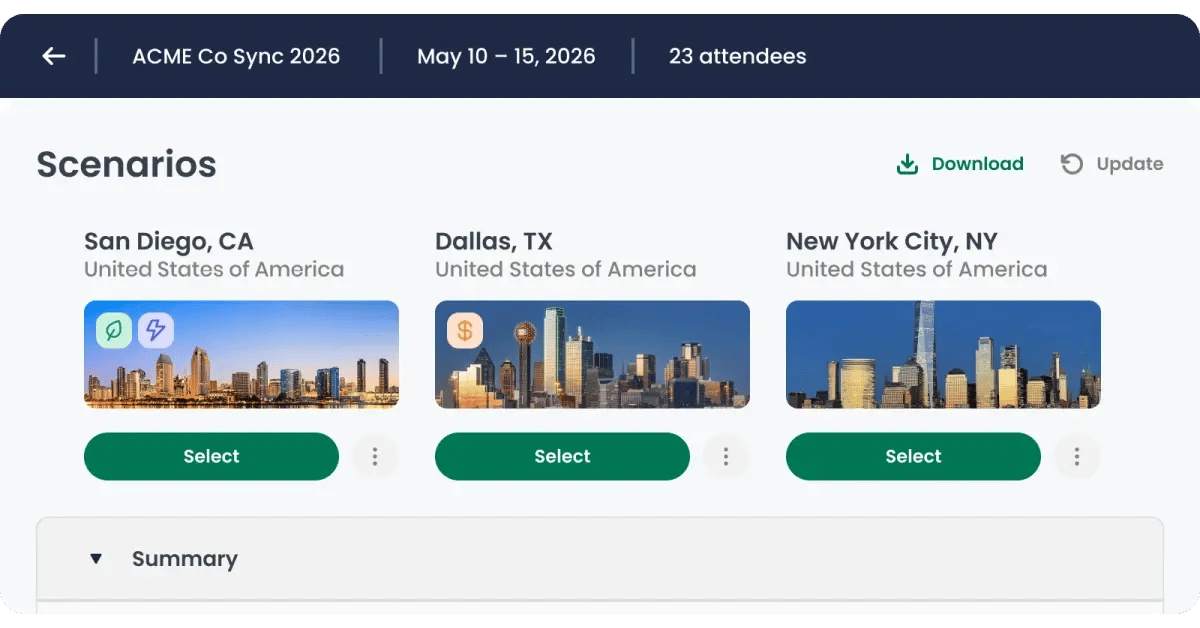
With data-backed research, you save hours comparing meeting locations, hotels, and even meeting spaces. TROOP helps you analyze flight routes, travel times, budgets, and more so you can easily choose the best fit for your meeting. You also have one platform to manage all the meeting details, including budgets, logistics, and attendee details. No more scattered spreadsheets, endless email threads, or manual processes.
The result is more than saved time. It’s a planning process that feels organized, transparent, and strategic — highlighting your ability to lead with insight and deliver great experiences for your executive and team.
Calendar or scheduling tools
4. Time and Date
Details matter when you’re coordinating meetings across time zones. Tools like Time and Date instantly surface the best meeting times for all participants once you’ve entered their locations — removing the guesswork with global scheduling.
Time and Date cuts down on endless back-and-forth, eliminates daylight-saving mix-ups, and helps you lock in multi-region meetings quickly and accurately. For EAs with busy schedules and even busier executives, this tool saves time and prevents time zone mix-ups.
5. Calendly
Calendly is a tool many of us are familiar with. It makes it easier for others to book directly into available times on your calendar so you can quickly set meeting types, add buffer times, and sync across time zones — especially helpful when managing multiple executives or global teams. This allows for smoother coordination, fewer scheduling errors, and a calendar that runs itself.
6. Toggl Track
Toggl Track helps you see where your time really goes — both your own and, when needed, your executive’s. With one-click tracking and desktop or mobile access, it makes it simple to log work without interrupting your day.
The real value, however, comes from its reporting. You can easily spot how much time goes into projects, meetings, or admin work, giving you data to support budget discussions, identify efficiencies, and highlight where your support drives the most impact.
Other tools
7. Grammarly
Clear, professional communication is part of every EA’s role — and Grammarly makes it effortless. It helps you write with confidence across emails, documents, and chats, catching tone, clarity, and grammar issues as you go. The tool improves your writing skills so that every message reflects the professionalism you, and others, expect. You’ll spend less time editing, fewer rounds refining drafts, and more time focusing on everything else on your plate.

8. Evernote
Evernote helps you stay organized and recall information exactly when you need it. It keeps meeting notes, agendas, documents, images, and even voice clips in one place — searchable and accessible across all your devices.
The tool offers a simple way to bring order to constant information flow. Whether you’re preparing a briefing, capturing insights during a meeting, or following up afterward, Evernote keeps details close at hand so nothing slips through the cracks.
9. Canva
Canva makes it easy to create professional, on-brand visuals — with free to low-cost plans, it’s easy to get started. The best part? You don’t need a design background to use the tool. From executive presentations to internal updates and meeting materials, it helps you bring ideas to life quickly while keeping every deliverable polished and consistent.
Find the best tool(s) for your workday
When used thoughtfully, technology doesn’t replace your expertise — it amplifies it. Every time you automate a step, anticipate a need, or share insights faster, you’re showing your value as a strategic partner.
Ask with confidence to get the "yes" to tools you need